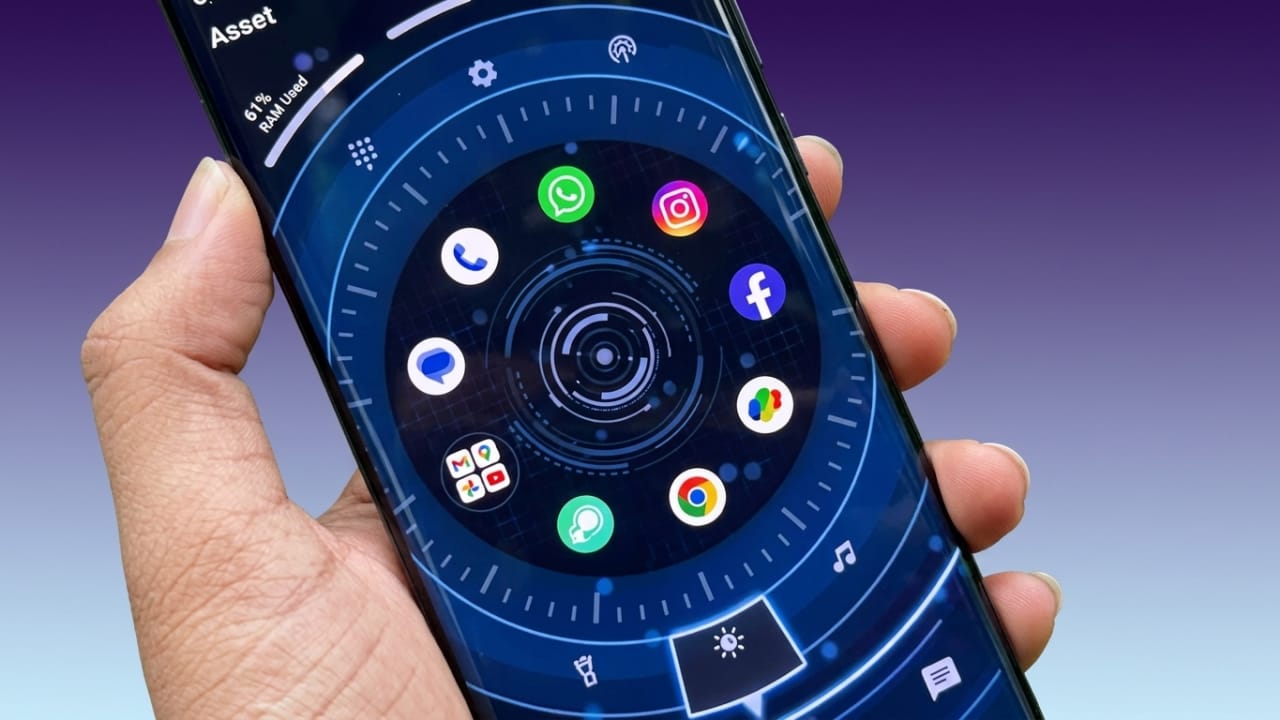
Android users often enjoy personalizing their smartphones to match their style. While the default home screen works well, many people prefer a more unique and visually appealing experience. If you’re looking for a launcher that can refresh the appearance of your device, Orbit Launcher is one option worth exploring.
Orbit Launcher combines modern design elements, customization tools, smart features, and stylish visual effects to create a fresh home screen experience. In this article, we’ll take a closer look at its key features and what makes it popular among Android users.
Advertisements
Also read: Alpha Hybrid Launcher Settings: Customize Your Android Home Screen Easily
What Is Orbit Launcher?
Orbit Launcher is an Android home screen replacement app designed to transform the look and feel of your device. Instead of the standard Android interface, it offers a futuristic design inspired by advanced technology and digital dashboards.
The launcher focuses on visual customization while also providing useful tools that help users access apps and information more efficiently.
Futuristic Themes and Visual Design
One of the biggest highlights of Orbit Launcher is its futuristic theme collection. The launcher includes visually rich designs that create a modern, technology-inspired appearance.
Some visual features include:
- Modern dashboard-style layouts
- Animated effects and transitions
- Digital-inspired design elements
- Stylish icon packs
- Smooth screen navigation
- Eye-catching home screen arrangements
These design options can make your smartphone feel more personalized and visually impressive.
Smart Features for Everyday Use
Orbit Launcher includes intelligent tools that aim to improve convenience during daily phone usage.
Depending on the version and available features, the launcher may help users by:
- Organizing frequently used apps
- Making important apps easier to access
- Offering quick shortcuts
- Improving navigation efficiency
- Adapting certain elements based on usage patterns
These features are designed to reduce the time spent searching for apps and settings.
Extensive Home Screen Customization
Customization is one of the main reasons people install third-party launchers. Orbit Launcher provides a variety of options for adjusting the appearance of your home screen.
Users can customize:
- Icon sizes
- Grid layouts
- Fonts and text styles
- Home screen animations
- Wallpapers
- Theme settings
This flexibility allows each user to create a setup that matches their personal preferences.
Useful Widget Support
Widgets can help display important information directly on the home screen without opening separate applications.
Orbit Launcher supports various widgets, including:
- Weather information
- Calendar events
- Digital or analog clocks
- Battery details
- System information
- Quick-access shortcuts
Having this information readily available can improve productivity and convenience.
Smooth Navigation Experience
A launcher should not only look good but also perform well. Orbit Launcher focuses on delivering a responsive experience with smooth navigation and quick interactions.
Users may benefit from:
- Faster access to apps
- Fluid scrolling
- Responsive gestures
- Improved screen transitions
- Reduced interface delays on compatible devices
Performance can vary depending on the smartphone model and available hardware resources.
Premium Appearance for Everyday Devices
Not everyone owns a high-end smartphone, but a launcher can significantly change how a device looks.
Orbit Launcher helps create a more polished and modern interface, making even mid-range devices feel refreshed. This is one reason why it attracts users who enjoy experimenting with new smartphone styles.
It is especially appealing to:
- Android customization fans
- Technology enthusiasts
- Mobile gamers
- Design lovers
- Users who enjoy futuristic themes
Better Organization and User Experience
A well-designed launcher can make everyday smartphone usage more comfortable.
Orbit Launcher aims to improve organization by helping users:
- Keep the home screen cleaner
- Access important apps faster
- Reduce visual clutter
- Improve overall navigation
A more organized layout can make routine tasks easier and more efficient.
Why Consider Orbit Launcher?
Here are some reasons users choose Orbit Launcher:
1. Modern Visual Style
Offers a futuristic and technology-inspired interface.
2. Flexible Customization
Provides multiple options for personalizing the home screen.
3. Smart Organization
Helps users arrange apps and shortcuts more efficiently.
4. Widget Compatibility
Supports useful widgets for quick information access.
5. Smooth User Experience
Designed for responsive navigation and easy interaction.
6. Attractive Design Elements
Includes animations, icons, and layouts that enhance the overall appearance.
Who May Like Orbit Launcher?
Orbit Launcher can be a good choice for:
- Android users who enjoy customization
- Students
- Professionals
- Content creators
- Mobile technology enthusiasts
- Gamers
- Smartphone reviewers
- Anyone interested in a fresh home screen experience
Pros
- Modern and futuristic design
- Wide range of customization options
- Smooth navigation experience
- Useful widget support
- Attractive visual effects
- Personalized home screen layouts
- Easy access to important apps
- Premium-looking interface
Cons
- Some visual effects may require more device resources
- Older smartphones may not handle advanced animations as smoothly
- New users may need time to explore all customization options

Also read: Computer Launcher for Android: Give Your Phone a Desktop-Style Look
Final Thoughts
Orbit Launcher is a feature-rich Android launcher designed for users who want a more modern and personalized smartphone experience. Its combination of stylish themes, customization tools, widget support, and smooth navigation makes it an interesting alternative to the default Android interface.
If you enjoy experimenting with your phone’s appearance and want a fresh, futuristic look, Orbit Launcher may be worth trying. It offers plenty of ways to customize your home screen while maintaining a user-friendly experience for everyday use.

I am a passionate Tech Writer with strong industry experience. I enjoy exploring the latest technological innovations and sharing clear, helpful insights with my audience.”
Advertisements