Have you ever watched an interesting Instagram Reel and then lost it while scrolling? Finding the same video again can be difficult, especially when you do not remember the creator’s name or the caption.
Fortunately, Instagram provides several ways to find videos you have watched or interacted with. Depending on your account and the features available in your app, you may be able to use Watch History, check your previous activity, browse saved posts, or search for the video using keywords.
Advertisements
In this guide, you will learn practical ways to find previously watched Instagram Reels and simple tips to keep your favourite videos easy to access.
Also read: How to Turn Off Pop-Up Blocker on iPhone (Safari and Chrome)
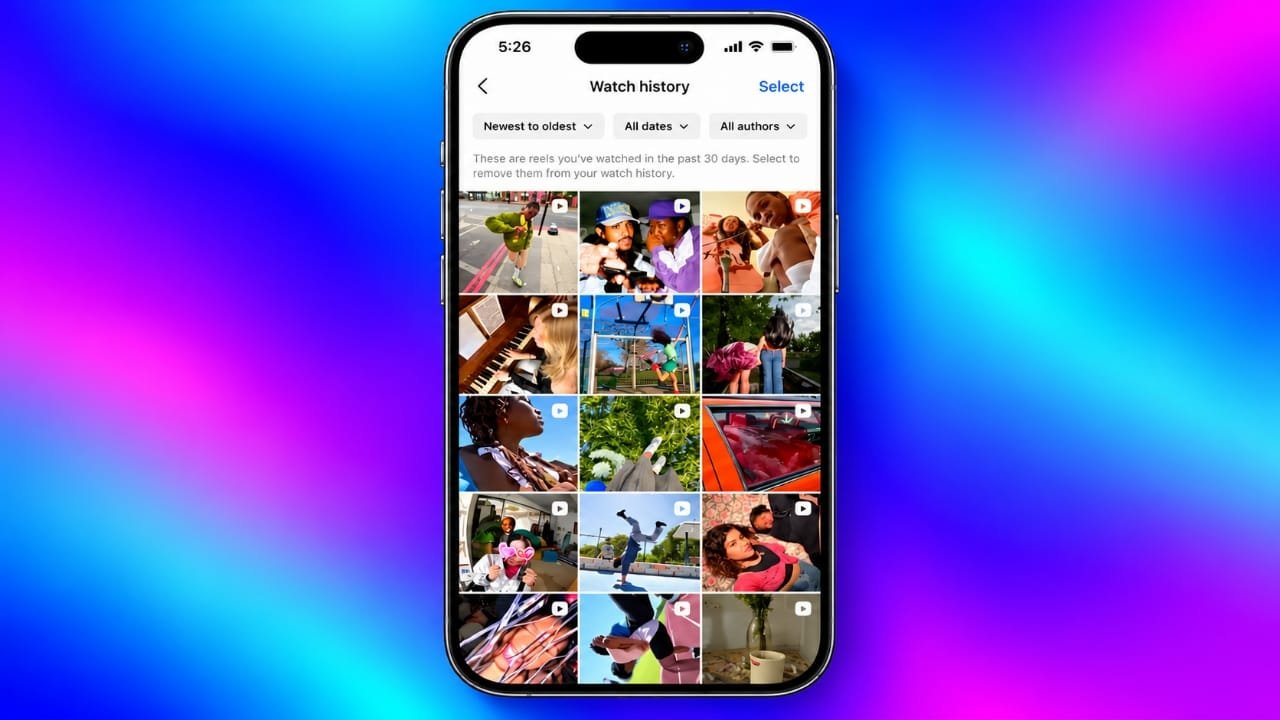
1. Check Instagram’s Watch History
Instagram’s Watch History feature can help you locate Reels you have watched recently. If this option is available on your account, it is a good place to start.
Follow these steps:
- Open the Instagram app on your phone.
- Go to your profile.
- Tap the three-line menu in the upper-right corner.
- Select Your Activity.
- Look for Watch History, if available.
- Browse the videos to find the Reel you want to watch again.
Depending on the available options, you may also be able to arrange the videos by date or narrow the list using filters.
Keep in mind that Instagram can change its menus and features over time. If Watch History does not appear in your account, update the app and check again. The feature may not be available to every user in the same way.
2. Look Through Your Reels Feed
Sometimes, you can find a previously viewed Reel by returning to Instagram’s Reels section.
This method is worth trying if you watched the video recently and have not refreshed your feed many times.
Here is what you can do:
- Open Instagram.
- Tap the Reels icon.
- Browse the videos displayed in your feed.
- Look for familiar clips, captions, sounds, or creators.
Instagram personalises the content shown in your feed, so previously viewed videos may appear again. However, there is no guarantee that a particular Reel will return.
If you cannot find the video this way, try checking your activity or searching for details you remember.
3. Find Reels Through Your Previous Interactions
Did you like a Reel, leave a comment, or interact with its creator? Your Instagram activity may help you locate it.
Instagram provides an activity section where you can review certain actions performed on your account.
To check your interactions:
- Visit your Instagram profile.
- Open the three-line menu.
- Tap Your Activity.
- Find the Interactions section.
- Open Likes, Comments, or another relevant category.
- Browse the available records to identify the Reel.
The available filters and sorting options may vary. If possible, arrange your activity by date to narrow down the search.
This method is particularly useful when you remember liking or commenting on a video but cannot recall who posted it.
What if you watched the Reel without interacting?
Your interaction history generally will not help you find a video you only watched. In that situation, check Watch History if it is available or try searching for the video using other clues.
4. Review Your Saved Reels
Saving a Reel is one of the easiest ways to keep useful Instagram videos organised.
If you saved the video before losing it, you can look for it in your Saved section.
Follow these steps:
- Open your profile.
- Tap the three-line menu.
- Select Saved.
- Open the relevant collection or saved-post list.
- Browse the available videos.
You might have saved the Reel in a collection for recipes, technology tips, travel ideas, workouts, or another topic.
Remember that saved posts are different from watch history. Instagram does not automatically save every video you watch, so this method only works for content you previously bookmarked.
5. Request a Copy of Your Instagram Information
If you cannot find an older Reel through the usual methods, you can consider downloading your Instagram account information.
Instagram offers a feature that lets users request a copy of certain account data. Depending on the information included in your download, it may provide useful details about your account activity.
To request your information:
- Open Instagram and visit your profile.
- Tap the three-line menu.
- Open Accounts Center, if required.
- Find the option for downloading or exporting your information.
- Select the Instagram account you want to use.
- Follow the instructions to choose the available information and file format.
- Submit your request.
Instagram will provide instructions when your file is ready. Processing time can vary, so check the status of your request and follow the official instructions.
How to Search the Downloaded Files
Once you receive your information, extract the downloaded archive if necessary and examine the available folders and files.
Look for files related to video activity, if they are included in your export. The exact file names, folder structure, and information provided can change, so do not assume that every account download contains a complete record of watched Reels.
If the export includes useful viewing information, you may be able to identify a creator or approximate viewing date and search for the video on that account.
However, account data does not guarantee that you will receive a direct link to every Reel you have watched. Some information may be unavailable or insufficient to identify a specific video.
Also, do not confuse uploaded Reels with watched videos. Information about content you published serves a different purpose from records of videos you viewed.
6. Search Instagram Using Keywords
If you remember even a small detail about the missing Reel, Instagram’s search function may help you find it.
Think about what appeared in the video. Was it about mobile phones, gaming, cooking, travel, education, or another subject? Did the creator mention a particular product or use a distinctive phrase?
Try the following approach:
- Open Instagram’s search section.
- Enter a keyword related to the video.
- Search for a creator’s username if you remember part of it.
- Explore relevant accounts and their Reels.
- Check captions, hashtags, and related content.
For example, if you watched a Reel explaining smartphone battery tips, search for terms such as “phone battery tips” or “smartphone battery settings.”
Using a few specific keywords is often more helpful than entering a broad phrase. You can also try different combinations if your first search does not produce the expected results.
7. Use Google to Look for Public Instagram Reels
Google can sometimes help you find public Instagram content that is difficult to locate through the app.
This method works best when you remember a specific phrase, subject, creator, or caption.
Open Google and combine the details you remember with a search for Instagram Reels. You can also use the following search operator:
site.com/reel
For example, if you remember a video about Android battery-saving settings, you could search for:
site:instagram.com/reel Android battery saving tips
Review the results for familiar captions, thumbnails, and creator names. If the first search does not work, try different keywords or a phrase you remember from the video.
There are limitations to this method. Search engines do not index every Instagram Reel, and private, deleted, or unavailable content may not appear in the results.
5 Simple Ways to Keep Your Favourite Reels
Finding a lost Reel can take time. These habits can make it easier to revisit useful videos in the future.
1. Save Interesting Videos
When you find a Reel worth keeping, tap the available save option. You can organise saved posts into collections where that feature is supported.
This is useful for tutorials, recipes, educational videos, and other content you may want to revisit.
2. Like Videos You Want to Find Again
If you enjoy a Reel and want an additional way to locate it, consider liking it. You can later review your liked content through Instagram’s activity settings.
A like is not a substitute for saving a video, but it can provide another useful reference point.
3. Copy the Reel’s Link
For videos that are especially important, use Instagram’s sharing menu to copy the link when the option is available.
You can store the link in a notes app or send it to yourself through a messaging service. Whether it continues to work depends on the video’s availability and access permissions.
4. Organise Your Saved Collections
Create separate collections for different interests, such as technology, study tips, fitness, travel, or cooking.
A clear organisation system makes it easier to find a particular Reel without scrolling through a long list of saved posts.
5. Be Careful With Third-Party Tools
You may come across websites or applications claiming to recover Instagram viewing history or download any Reel. Be cautious before using them.
Avoid services that request your Instagram password, unnecessary account permissions, or sensitive personal information. Use Instagram’s official features whenever possible, and respect creators’ rights and content restrictions when saving or sharing videos.
Frequently Asked Questions
Can I see my recently watched Instagram Reels?
You may be able to use Instagram’s Watch History if the feature is available on your account. You can also check previous interactions, saved posts, and account information for additional clues.
How far back can I see my Instagram Reels history?
The period covered by Watch History depends on the feature’s current availability and implementation. Check the information displayed in your app rather than assuming that every account has the same history period.
Can I find a Reel I watched without liking it?
Yes, it may still be possible. Check Watch History if available, search Instagram using remembered keywords, or look for the creator through Google. Finding the video is not guaranteed if you have very few details.
Can I check watched Instagram Reels on a computer?
You can use Instagram’s website to review some account activity and access available account-information tools. However, individual features and menu options may differ between desktop and mobile versions.
Can other people see my Instagram Watch History?
Your personal viewing history is not generally displayed as a public list on your profile. However, interactions such as likes and comments may be visible to others depending on the post, account settings, and Instagram’s current features.
Why can’t I find Watch History in my Instagram app?
Instagram’s interface and feature availability can vary. Update the application, check Your Activity, and review Instagram’s official help information. If the option is not available, use saved posts, interactions, or search as alternatives.
Also read: HMD Vibe 2 Max Leak Suggests 108MP Camera, 6,000mAh Battery and 120Hz Display
Conclusion
Finding a previously watched Instagram Reel is easier when you know where to look. Start by checking Watch History if it is available, then review your interactions and saved posts. If those options do not help, search Instagram or Google using details you remember about the video.
For older content, downloading your Instagram account information may provide additional clues, although it cannot guarantee a complete viewing record.
The simplest way to avoid losing useful videos is to save them as soon as you find them. Organising saved posts and keeping important links in a safe place can save you time the next time you want to watch a favourite Reel again.

I am a passionate Tech Writer with strong industry experience. I enjoy exploring the latest technological innovations and sharing clear, helpful insights with my audience.”
Advertisements