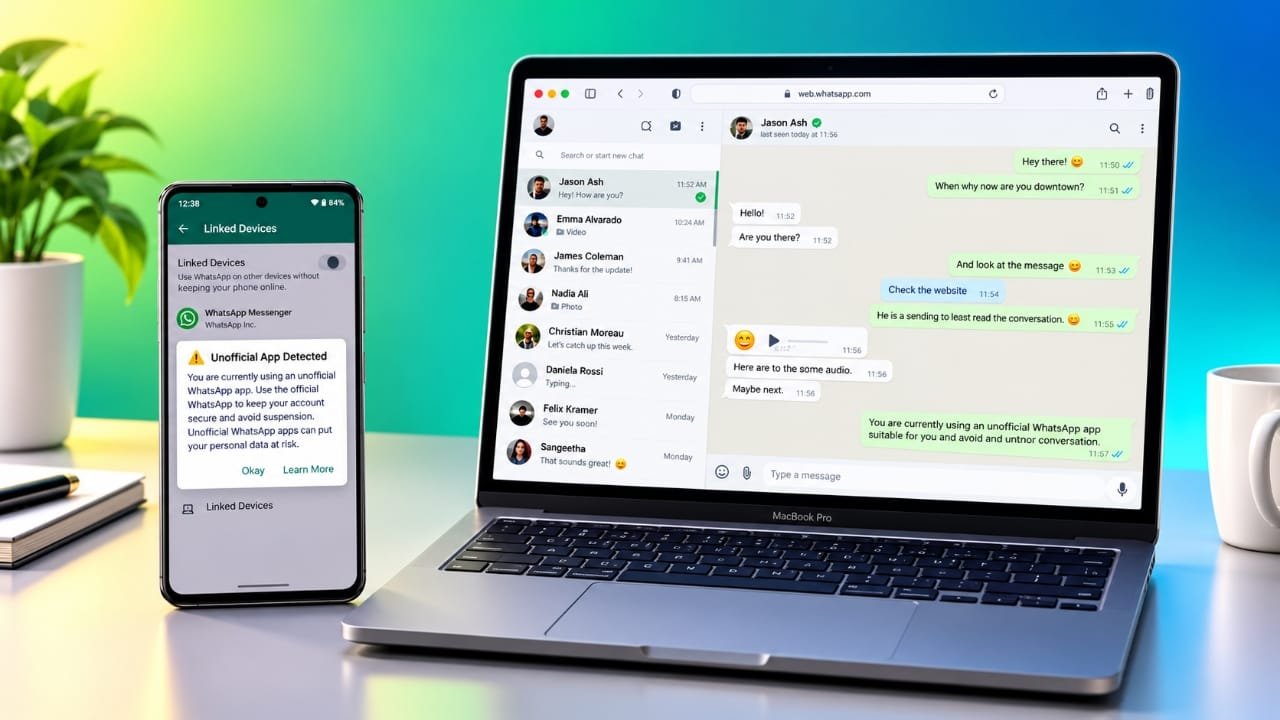
WhatsApp is reportedly working on a new security feature that may help users identify when they are accessing their accounts through unofficial web clients. Although the feature is still being tested, it reflects the company’s continued efforts to improve user privacy and account security.
If introduced, the warning could appear inside the Linked Devices section of WhatsApp, encouraging users to switch to the official WhatsApp Web service instead of using third-party tools.
Advertisements
Also read: How to Add a Driver’s License or State ID to Apple Wallet
A New Security Reminder May Be Coming
Reports suggest that some users testing recent Android beta versions of WhatsApp have spotted signs of this upcoming feature.
Instead of only displaying connected devices, the Linked Devices page may also show a message if an unofficial web client is being used. The notification would recommend moving to the official WhatsApp Web platform for a safer experience.
At this stage, the feature is still under development, and WhatsApp has not announced a release date for all users.
Why WhatsApp Is Focusing on Official Web Access
The main goal behind this change appears to be improving security.
Official WhatsApp Web is developed and maintained by WhatsApp, which means it follows the company’s security standards and privacy protections. Unofficial web clients or browser extensions are created by third parties and may operate differently.
While some of these tools offer additional features, they may also request extra permissions or process your data in ways that are not always clear. Since these applications are not controlled by WhatsApp, users should be careful before trusting them with personal conversations or account access.
This does not mean that every third-party client is unsafe. However, using official software generally provides a more reliable and secure experience.
How This Could Affect Your Privacy
For most people, this warning would simply serve as a reminder to review how they access WhatsApp on their computer.
If you already use the official WhatsApp Web website, there is likely nothing you need to change. However, if you depend on an unofficial client, browser extension, or similar tool, it may be worth checking whether it is truly necessary.
Messages, photos, documents, and other personal information deserve strong protection. Choosing official software can help reduce unnecessary privacy risks.
Checking Your Linked Devices
WhatsApp makes it easy to see which devices are connected to your account.
Follow these steps:
- Open WhatsApp on your phone.
- Go to Settings.
- Tap Linked Devices.
- Review the list of connected devices.
If you notice a device you don’t recognize or no longer use, remove it immediately. Reviewing this section from time to time is a good security habit, even if you haven’t received any warning.
Will Unofficial Clients Stop Working?
There is currently no indication that WhatsApp plans to block all unofficial web clients.
Based on available reports, the new feature is expected to be a warning rather than a restriction. Users may still be able to use third-party clients, but repeated reminders could encourage them to switch to the official platform.
Since the feature is still being tested, its final design could change before a wider release.
WhatsApp Continues to Improve Security
Over the years, WhatsApp has introduced several privacy and security improvements, including stronger account protection, scam prevention features, and better privacy controls.
Adding warnings about unofficial web clients would fit into this broader effort to help users make safer choices and reduce the chances of exposing their accounts to unnecessary risks.
Tips for Staying Safe on WhatsApp
You can improve your account security by following a few simple practices:
- Use the official WhatsApp Web platform whenever possible.
- Review your Linked Devices regularly.
- Remove devices you no longer recognize or use.
- Avoid downloading unofficial WhatsApp applications from unknown websites.
- Be cautious before granting browser extensions access to your WhatsApp account.
These simple steps can help keep your conversations and personal information more secure.
When Could the Feature Be Released?
WhatsApp has not confirmed when this warning will become available for everyone.
Features that appear in beta testing do not always reach the public immediately, and some may be changed or removed before the final release. Users should wait for an official announcement regarding availability.
Also read: How to Transfer Music From iPhone to iPhone Easily
Final Thoughts
The reported warning for unofficial web clients may seem like a small update, but it highlights an important aspect of online security. While third-party tools may provide additional functionality, they can also introduce privacy concerns if they are not developed or maintained by trusted sources.
Using the official WhatsApp Web service, checking your linked devices regularly, and avoiding unnecessary third-party software are simple steps that can help keep your account safer. If WhatsApp eventually introduces this warning, it will serve as another reminder to review how your account is being accessed and choose the most secure option available.

I am a passionate Tech Writer with strong industry experience. I enjoy exploring the latest technological innovations and sharing clear, helpful insights with my audience.”
Advertisements