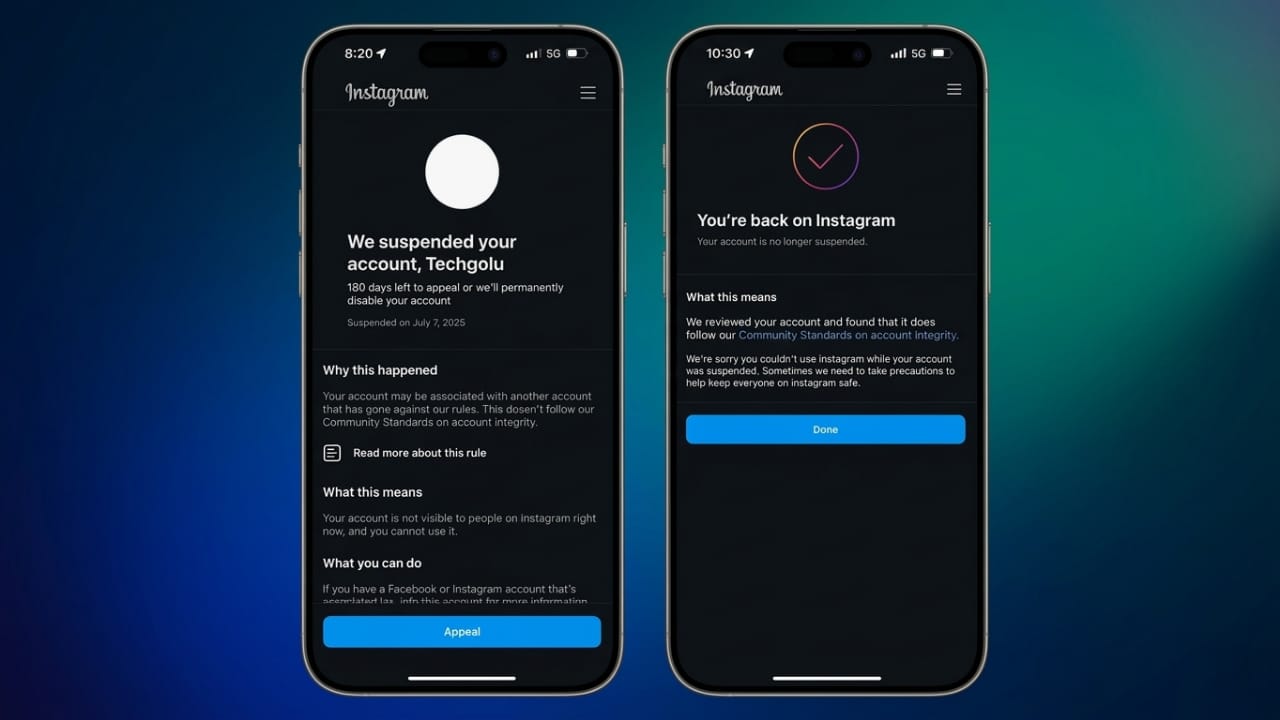
Losing access to an Instagram account can feel frustrating, especially if it contains personal photos, business content, or years of work. In recent months, many users have reported sudden suspensions or disabled accounts, sometimes without a clear reason.
The good news is that some accounts can still be restored if you follow the correct recovery process through official Meta and Instagram support channels. The key is to stay calm, avoid risky shortcuts, and complete each step carefully.
Advertisements
Also read: Apple May Introduce AI Agents to the App Store as Siri Expansion Raises Developer Concerns
Why Instagram Suspends Accounts
Instagram uses automated systems to detect unusual activity and rule violations. Sometimes these systems make mistakes and accidentally flag normal accounts.
Some common reasons for account suspension include:
- Excessive following or liking activity
- Posting the same comment repeatedly
- Using unapproved third-party apps
- Suspicious login attempts from different locations
- Fake engagement or automation tools
- Violations of Instagram’s community guidelines
Even legitimate accounts can occasionally be restricted if Instagram detects behavior that looks unusual.
Step 1: Try Logging Into Your Account
Start by signing into Instagram normally using your usual device and internet connection.
If your account has been restricted, Instagram may display messages like:
- “Your account has been disabled”
- “We suspended your account”
- “Appeal this decision”
- “Take action”
Read the instructions carefully and avoid rushing through the process. Enter only accurate information.
Step 2: Submit an Official Appeal
If Instagram gives you the option to appeal the suspension, use the official form provided in the app or website.
While submitting the appeal:
- Explain the issue clearly and honestly
- Keep your message polite and professional
- Avoid aggressive or emotional language
- Do not submit multiple appeals repeatedly
If the suspension happened by mistake, this is usually the safest recovery method.
Step 3: Complete Identity Verification Correctly
Instagram may ask you to confirm your identity before restoring access.
Verification requests may include:
- Selfie video verification
- Government-issued ID
- Identity confirmation photos
To avoid delays:
- Upload clear and genuine documents
- Do not edit or modify images
- Use real information only
- Make sure your details match the account whenever possible
Incorrect or blurry submissions can slow down the review process.
Step 4: Check Your Email Regularly
Instagram often sends important recovery updates through your registered email address.
Check all folders, including:
- Inbox
- Spam
- Promotions
- Junk
Some recovery links expire quickly, so it’s important to respond on time.
Step 5: Use Only Official Meta Recovery Methods
If additional help is needed, use Meta’s official support and recovery pages.
Avoid relying on:
- Fake recovery agents
- Telegram “experts”
- Paid hackers
- Unofficial recovery services
Many online recovery offers are scams designed to steal money or account details.
Step 6: Avoid Repeated Login Attempts
A common mistake is repeatedly trying to log in from multiple devices or networks.
This can increase Instagram’s security concerns.
Avoid:
- Constant login attempts
- Switching devices repeatedly
- Using VPN services unnecessarily
- Submitting appeal forms multiple times
Instead:
- Use one trusted device
- Stay on your normal internet connection
- Follow Instagram’s instructions patiently
Step 7: Remove Unsafe Third-Party Apps
Some suspensions happen because accounts are connected to unsafe automation tools.
Examples include:
- Fake follower apps
- Auto-like tools
- Mass messaging software
- Unofficial analytics platforms
Remove suspicious apps immediately through:
- Instagram settings
- Meta Account Center
- Facebook security settings
Common Mistakes That Trigger Instagram Suspensions
1. Mass Following and Unfollowing
Following or unfollowing large numbers of accounts in a short time can look automated.
Avoid sudden spikes in activity.
2. Repeating the Same Comments
Posting identical comments across multiple posts may trigger Instagram’s spam filters, even if done manually.
3. Using Bots or Automation Tools
Instagram can detect artificial engagement patterns such as:
- Automated likes
- Auto-comments
- Fake followers
- Artificial account growth
These tools may provide short-term growth but can damage accounts over time.
4. Sending Spam Direct Messages
Repeated promotional messages or copy-paste DMs can quickly lead to restrictions.
Focus on genuine conversations instead of aggressive promotion.
Content That Can Lead to Account Restrictions
Instagram enforces strict content policies. Accounts may face action for posting:
- Violent or harmful content
- Hate speech
- Harassment or threats
- Explicit adult material
- Copyrighted material without permission
- Misleading financial schemes
- Spam or deceptive promotions
Repeated violations can increase the risk of permanent removal.
How to Secure Your Account After Recovery
If your account is restored, take steps to improve security immediately.
Enable Two-Factor Authentication
This adds extra protection against unauthorized access.
You can use:
- Authentication apps
- SMS verification
- Backup recovery codes
Change Your Password
Create a strong password that:
- Is unique
- Uses letters, numbers, and symbols
- Is not reused on other websites
Stop Using Risky Growth Methods
Avoid shortcuts that promise instant followers or rapid engagement.
Instead, focus on:
- Useful content
- Consistent posting
- Real audience interaction
- Building trust naturally
Safe and Sustainable Instagram Growth Tips
Long-term growth usually comes from genuine activity.
Better strategies include:
- Posting valuable content regularly
- Engaging naturally with followers
- Using approved Meta tools
- Building a niche community
- Avoiding fake engagement completely
Organic growth may take more time, but it is far safer and more stable.
Important Reality Check
Not every banned account can be recovered.
If Instagram permanently removes an account for serious policy violations, recovery may not be possible.
Be careful of anyone promising:
- Guaranteed recovery
- Instant unban services
- “Inside Meta contacts”
- Paid recovery tricks
These claims are often misleading or fraudulent.
Also read: Instagram Introduces “Instants” Feature for Quick Photo Sharing in DMs
Final Thoughts
Recovering a suspended Instagram account requires patience and careful action. The safest approach is always to work through Instagram and Meta’s official recovery systems.
In many cases, account suspensions can be avoided by staying away from spam activity, fake engagement, and unsafe third-party tools.
If you want long-term success on Instagram, focus on authentic content, steady growth, and real engagement instead of shortcuts that could put your account at risk.

I am a passionate Tech Writer with strong industry experience. I enjoy exploring the latest technological innovations and sharing clear, helpful insights with my audience.”
Advertisements