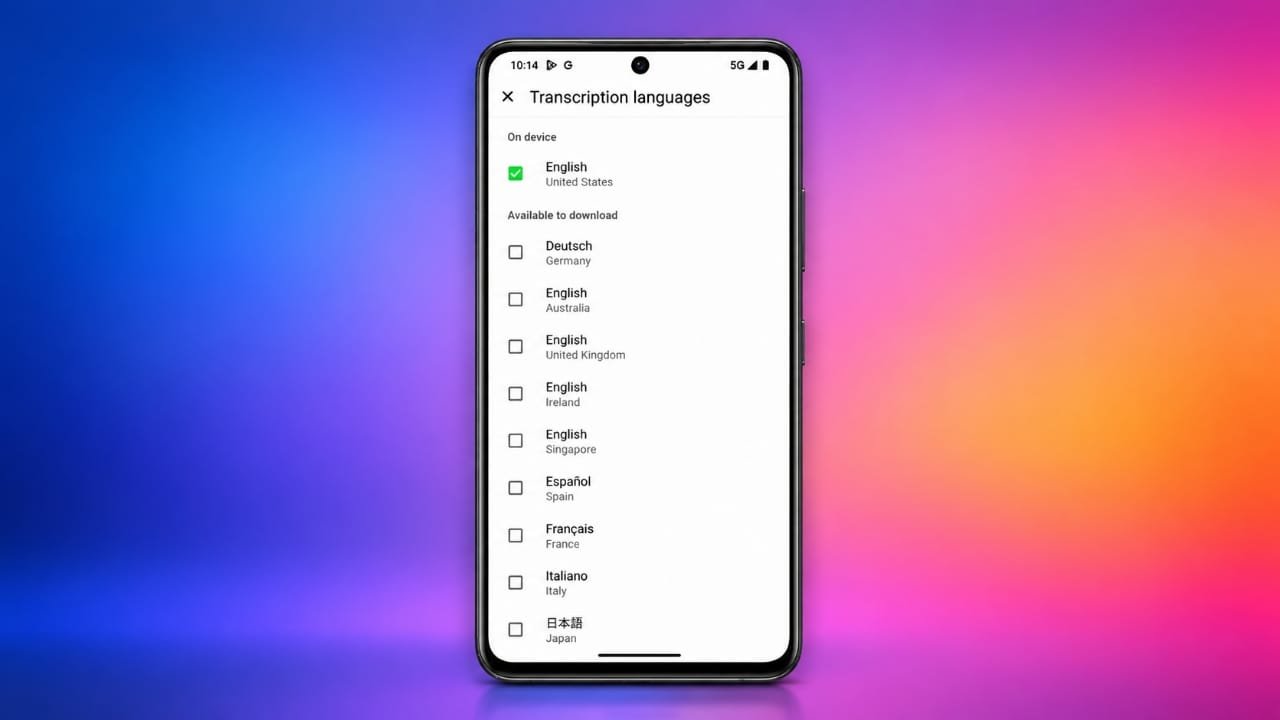
WhatsApp is making its voice message transcription feature more useful by expanding the number of languages it can recognize on Android. The feature is designed for situations where you may want to understand a voice note but cannot play the audio at that moment.
For example, you might receive a voice message while working, studying, travelling or sitting somewhere where playing audio is inconvenient. Instead of listening to the entire recording, you can use a text transcription to read what was said.
Advertisements
The expanded language support is currently appearing for some WhatsApp beta users and is expected to reach additional users as the rollout continues.
Also read: Google Gemini Notebook Gets New AI Features for Voice, Audio Recording and Learning
More Languages Are Being Added
The language expansion has been spotted in WhatsApp beta for Android version 2.26.37.5. The update brings additional language options to the voice message transcription feature.
The newly available options include English, German, French, Italian and Japanese. They add to languages that were already supported, such as Arabic, Spanish, Hindi, Portuguese and Russian.
However, the exact languages available can depend on your WhatsApp version and account. New features are often released gradually, so two users with the same app version may not necessarily see the same options immediately.
Read Voice Messages Without Playing Them
WhatsApp’s transcription feature converts the spoken content of a voice message into text. Once a transcription is generated, you can read the message directly in the chat.
This can be handy when you receive a lengthy voice note and don’t have a suitable place to listen to it. A quick look at the text can also help you understand the main message without playing the recording aloud.
The feature is particularly useful when you are in a quiet environment where playing audio could disturb other people.
Transcription Happens Directly on Your Device
WhatsApp has designed voice message transcription with privacy in mind. The transcription process takes place on your device rather than requiring the voice recording to be sent to an external service for conversion.
WhatsApp’s personal messages and calls use end-to-end encryption. The company says that voice messages and their transcripts are protected, meaning people outside the chat cannot access their contents through WhatsApp.
You May Need to Download a Language Pack
Voice message transcription uses language packs that are downloaded to your phone. During setup, WhatsApp can ask you to select a language and download the necessary files.
After the language pack has been installed, the phone can use it for transcription. This local approach also means that transcription can continue to work without an internet connection after the required language pack has been downloaded.
You can change the transcription language later through WhatsApp’s settings if you regularly receive voice messages in another supported language.
How to Enable Voice Message Transcriptions
If the feature is available on your Android phone, you can check it through WhatsApp’s settings.
Go to WhatsApp > Settings > Chats > Voice Message Transcripts and enable the option. Select your preferred language and download the language pack if WhatsApp asks you to do so.
After enabling the feature, open a chat containing a voice message. Press and hold the voice message and look for the Transcribe option.
The app will then process the recording and display the available text transcription. Longer voice messages may take a little more time to process.
Hindi Support Is Helpful for Indian Users
Hindi is among the languages supported by WhatsApp’s voice transcription system. This can be useful for users who frequently receive Hindi voice notes.
Instead of playing every Hindi voice message, users can read the generated text when listening to audio isn’t convenient.
Keep in mind that automatic transcription may not always be completely accurate. Background sounds, unclear pronunciation, different accents and incorrect language selection can affect the result. Some words may therefore appear incorrectly or may not be recognized at all.
Also read: Best USB Wi-Fi Adapters for Better Range, Speed, and Connectivity
Wider Android Rollout Is Still Pending
The expanded language selection is not available to every Android user yet. At the moment, the new options are being introduced gradually, including through WhatsApp’s beta program.
If you have updated WhatsApp but cannot find the additional languages, it does not necessarily indicate a problem with your phone. WhatsApp may simply not have enabled the feature for your account yet.
Keeping the app updated gives you access to new features when they become available for your account.

I am a passionate Tech Writer with strong industry experience. I enjoy exploring the latest technological innovations and sharing clear, helpful insights with my audience.”
Advertisements