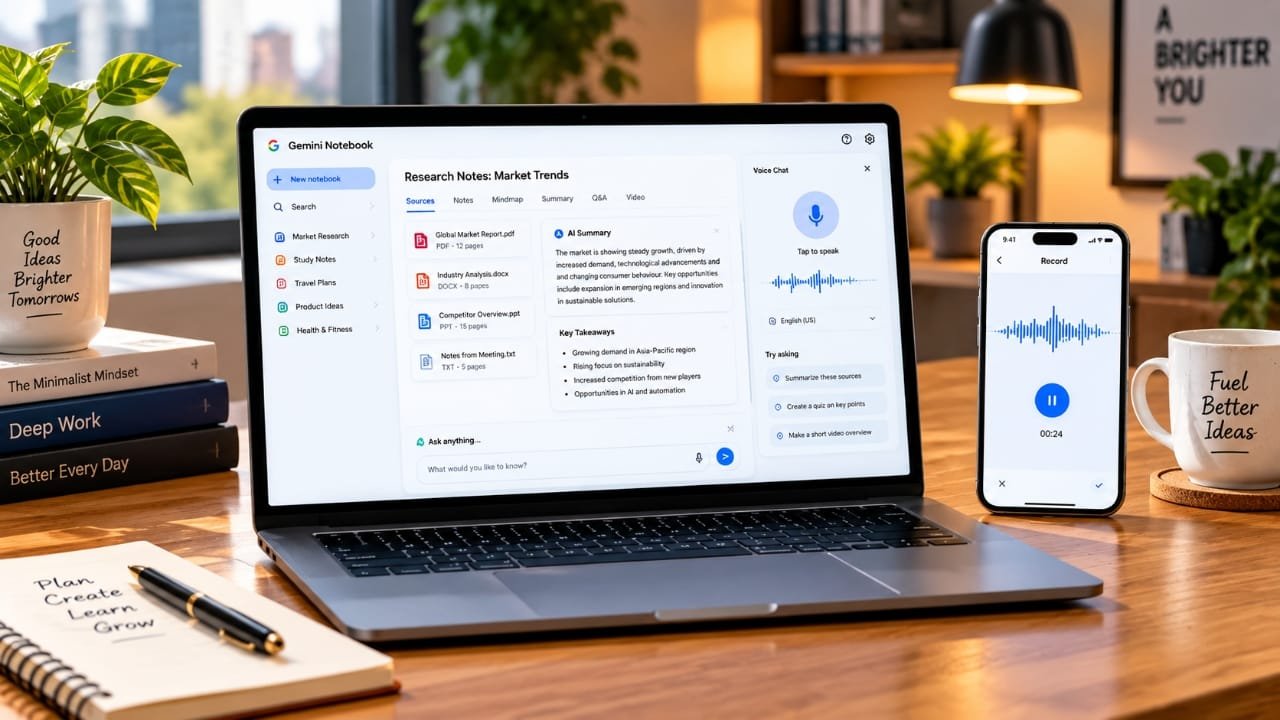
Google is expanding the capabilities of Gemini Notebook with a new set of AI-powered tools aimed at making research, studying and handling information easier.
The latest update brings features such as real-time voice conversations, mobile audio recording, interactive learning materials, additional quiz formats and short AI-generated video explanations.
Advertisements
With these additions, Google appears to be moving Gemini Notebook beyond basic document analysis and turning it into a more complete workspace for learning and research.
Here’s everything you need to know about the latest changes.
Also read: Best USB Wi-Fi Adapters for Better Range, Speed, and Connectivity
Talk to Your Notebook Using Your Voice
One of the most noticeable additions is real-time voice interaction.
Users can now speak with their notebook instead of typing every question. You can ask for an explanation, discuss a topic from your sources or get help understanding a difficult section of your material.
The important part is that the conversation remains connected to the sources you have added to the notebook. This allows the AI to respond based on the information available in that particular workspace rather than treating the conversation like a completely general chatbot session.
Google says the voice feature is being expanded to support nearly 100 languages.
Record Lectures Directly From Your Phone
The mobile version of Gemini Notebook is also gaining an audio recording feature.
This could be useful for students who want to record lectures or for users who need to capture meetings, discussions or ideas while on the go.
The recorded audio can be added to the notebook along with other sources. This means users can potentially keep different types of information together instead of managing them across several applications.
For example, a student could have a single notebook containing:
- Lecture recordings
- PDF files
- Class notes
- Research documents
- Personal notes
- Study materials
Having everything in one place can make it easier to revisit information later.
More Interactive Ways to Learn
Google is also adding more interactive learning options to Gemini Notebook.
Instead of relying only on text-based summaries, users can turn their source material into different types of learning content. Depending on the features available to an account, this can include summaries, infographics, flashcards and quizzes.
This approach can be particularly useful for students who want to transform existing study material into something they can actively work through.
Rather than simply reading a long document again, users can use these tools to review important information in different formats.
New Quiz Formats for Better Revision
The quiz experience is getting additional question types as well.
Users can encounter formats such as:
- Multiple-choice questions
- Multiple-answer questions
- Short-answer questions
- Fill-in-the-blank questions
There are also options to customize quizzes and flashcards instead of relying entirely on automatically generated content.
After a quiz, the tool can help users identify topics that may require additional revision. This makes the feature more practical for studying and self-assessment.
However, AI-generated questions should still be reviewed when they are being used for important academic preparation.
Turn Notebook Information Into Short Videos
Another new addition is the ability to create short AI-powered video overviews.
The feature can transform information from a notebook into a brief educational video that combines narration with visual explanations.
This could be helpful when reviewing subjects that are easier to understand through a combination of audio and visuals. Examples include scientific concepts, formulas, diagrams and other complicated study topics.
Google is also expanding Short Video Overviews to more than 80 languages.
For users who prefer watching and listening instead of reading lengthy documents, this provides another way to review the same information.
Gemini Notebook Is Becoming a Broader AI Workspace
The direction of Gemini Notebook is becoming clearer as more of these features are added.
The service has traditionally been focused on helping users work with documents, notes and research sources. The new tools extend that experience into recording, conversation, learning and revision.
A student, for example, could use a notebook to:
Add research material → record a lecture → ask questions using voice → create study notes → take a quiz → review the topic through a video
This connects several tasks that would normally require different apps.
Google renamed NotebookLM as Gemini Notebook earlier this year while continuing its focus on working with user-provided sources and research material.
Availability May Vary
The new features are not necessarily available to every user at the same time.
Google is rolling them out gradually across its web and mobile experiences. Some tools may also be introduced first to users with eligible Google AI subscriptions.
Availability can depend on factors such as the user’s account, country and the current stage of Google’s rollout.
Because of this, two users may see different features even when they are using the same Gemini Notebook service.
Google Is Expanding AI Tools for Students
Google is also continuing to expand access to its AI features for eligible students through education-focused offers and plans.
The exact benefits and availability depend on the market and eligibility requirements. Students who already use Gemini Notebook for coursework may eventually be able to use more of these tools as they become available in their region.
Why the New Features Are Useful
The biggest change isn’t necessarily any single feature. It is the way these tools can work together.
Previously, someone might record a lecture in one app, save documents in another, use a separate tool for summaries and find another service for creating quizzes.
Gemini Notebook is attempting to bring more of those activities into one workspace.
Voice interaction is another important addition because it provides a more convenient way to work with information. Instead of stopping to type a detailed question, users can speak their question and continue the conversation.
That could be especially useful when reviewing notes or exploring a large collection of sources.
Things to Keep in Mind
There are a few important points to remember before using the new features.
First, the rollout is gradual, so a particular feature may not appear on your account immediately.
Second, some tools may be limited to eligible Google AI plans or accounts.
Finally, AI-generated information should not automatically be treated as error-free. Summaries, explanations, quizzes and other generated material should be checked against the original sources when accuracy is important.
This is particularly relevant for academic assignments, research and other situations where incorrect information could cause problems.
Also read: How to Free Up iPhone Storage Without Deleting Photos
Final Thoughts
The latest Gemini Notebook update adds several features that expand its role in learning, research and productivity.
Voice conversations provide a new way to interact with source material, while the mobile recorder can help users add lectures and other audio content to their notebooks.
The additional quiz formats, flashcards, interactive learning tools and short video overviews also give users more ways to review and understand information.
Not every feature will be available to everyone immediately, but the overall update shows Google’s broader direction for the platform.
Gemini Notebook is gradually developing from a source-focused research assistant into a more versatile workspace where users can collect information, discuss it, create learning material and review it in different formats.

I am a passionate Tech Writer with strong industry experience. I enjoy exploring the latest technological innovations and sharing clear, helpful insights with my audience.”
Advertisements