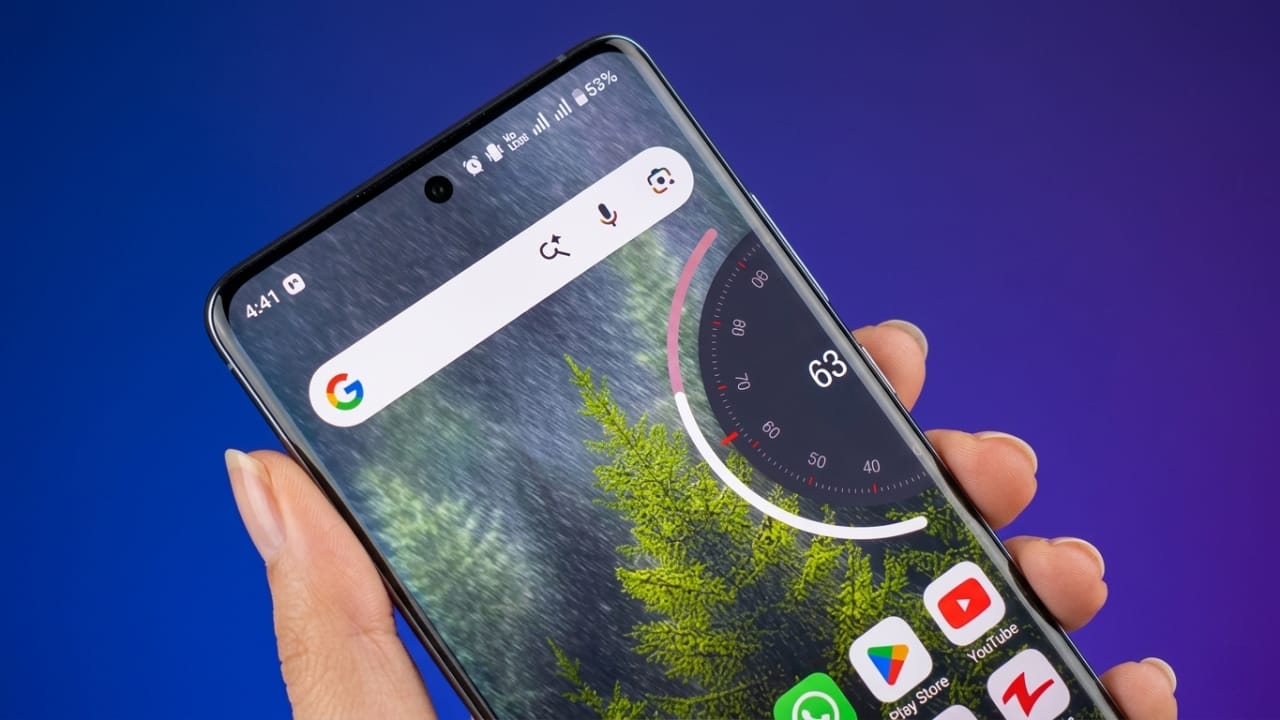
Most Android phones come with a standard volume slider that works well but looks almost the same across different devices. If you enjoy customizing your phone’s appearance, you might want something more modern. That’s where NoVolume comes in.
NoVolume is a customization app that replaces your phone’s default volume panel with a clean, modern design inspired by the visual style of Nothing OS. It focuses on improving the look and feel of volume controls while keeping everyday use simple.
In this article, we’ll explore what NoVolume offers, its key features, how to set it up, and who may find it useful.
Also read: GO Launcher S Review: Customize Your Android With Stylish Themes and HD Wallpapers
What Is NoVolume?
NoVolume is an Android app that lets you replace the default volume interface with a redesigned slider. Instead of the standard volume panel, you get a minimal and elegant interface that gives your phone a refreshed appearance.
The app is designed for users who enjoy personalizing their devices without making major changes to the system.
Why Choose NoVolume?
Many people customize wallpapers, icons, and themes, but the volume panel often remains unchanged. NoVolume adds a fresh design to this everyday feature, making your phone feel more polished.
Some reasons users choose NoVolume include:
- Modern and minimal interface
- Smooth volume animations
- Lightweight performance
- Customization options
- Easy-to-use controls
Main Features
1. Modern Interface
One of the biggest highlights of NoVolume is its clean design. The volume slider has a premium appearance inspired by minimalist smartphone interfaces, giving your device a more refined look.
2. Smooth Animations
The app includes fluid animations when adjusting volume levels. These small visual improvements can make everyday interactions feel more responsive.
3. Haptic Feedback
If your phone supports vibration feedback, NoVolume can provide gentle haptic responses while changing the volume. This adds a more natural feel to the controls.
4. Personalization Options
Depending on your device and the app version, you may be able to customize elements such as:
- Slider position
- Size
- Appearance
- Other visual settings
This allows you to match the volume panel with your preferred style.
5. Lightweight Performance
NoVolume is designed to run efficiently in the background. On supported devices, it generally has minimal impact on overall phone performance.
How to Set Up NoVolume
Getting started is straightforward.
Step 1: Install NoVolume from the Google Play Store.
Step 2: Open the app and allow the required permissions. Accessibility permission is usually needed so the app can display its custom volume interface.
Step 3: Follow the setup instructions provided inside the app to activate the custom volume panel.
Step 4: Customize the appearance according to your preferences.
User Experience
Once configured, the default volume panel is replaced with a cleaner and more stylish interface.
Many users appreciate:
- Simple design
- Smooth operation
- Fast response
- Easy navigation
If you enjoy minimal UI designs, the overall experience may feel more polished than the standard volume slider.
Performance
Customization apps sometimes raise concerns about speed and battery usage. NoVolume is built to be lightweight, and on compatible devices it is intended to run efficiently.
Actual performance may vary depending on your phone model, Android version, and other apps running on your device.
Privacy and Permissions
NoVolume requires certain permissions to replace the system volume interface. Before granting any permission, it’s always a good idea to review what the app requests and why it needs access.
Downloading the app from trusted sources, such as the Google Play Store, can also help improve security.
Who Should Try NoVolume?
This app may be a good choice if you:
- Like customizing your Android phone
- Prefer clean and minimal designs
- Enjoy modern user interfaces
- Want a different look without changing your entire launcher
Pros
- Attractive and modern design
- Smooth animations
- Lightweight app
- Easy setup
- Useful customization options
Things to Consider
- Some features may depend on your device or Android version.
- Certain customization options may require a premium version if offered by the developer.
- Compatibility can vary across different smartphones.

Also read: Gesture Lock Screen for Android – A Unique Way to Secure Your Phone
Final Thoughts
NoVolume is a simple customization app that gives your Android phone a fresh-looking volume control interface. Instead of changing how volume works, it focuses on improving the visual experience with a clean and modern design.
If you enjoy personalizing your device and want a more stylish volume slider, NoVolume is worth exploring. Before installing, check the app’s compatibility, permissions, and available features to ensure it works well with your device.

I am a passionate Tech Writer with strong industry experience. I enjoy exploring the latest technological innovations and sharing clear, helpful insights with my audience.”