YouTube is a helpful platform for learning new things and relaxing with entertainment. However, it is very easy to keep watching videos longer than planned. Many people later feel surprised when they realize how much time they actually spend on YouTube every day or week.
The good part is that YouTube and modern smartphones offer official and reliable ways to track your viewing time. Below are three easy methods to see your YouTube watch time on both mobile and desktop devices.
Advertisements
Also read: How to Enable or Disable YouTube Dark Mode – Simple Step-by-Step Guide
1. Use YouTube’s Built-In “Time Watched” Option
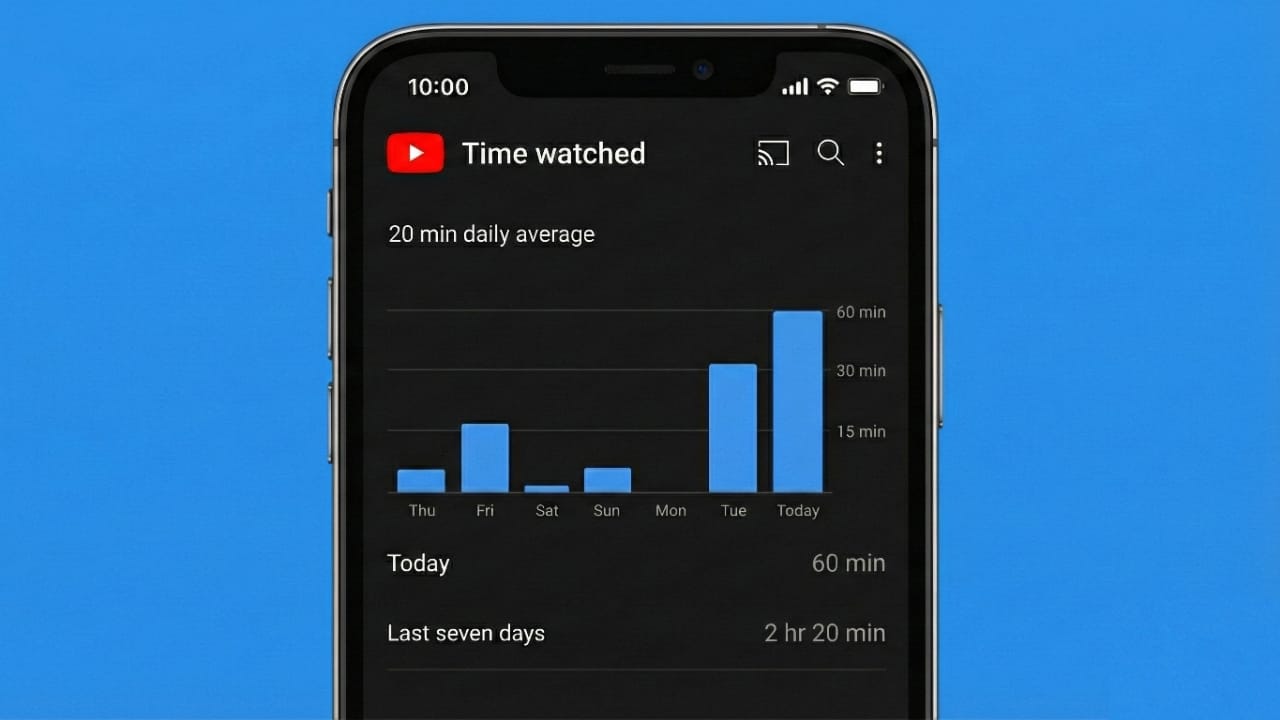
YouTube includes its own tracking tool that shows how long you have been watching videos. This is the most direct and accurate way to check your usage.
On Android and iPhone
- Open the YouTube app
- Tap your profile photo in the top corner
- Select Time watched
You will be able to see:
- Your average watch time per day
- Total time spent on recent days
- A simple chart showing your viewing pattern
This section gives a clear picture of your YouTube habits.
On Desktop
- Open YouTube in your web browser
- Click on your profile picture
- Choose Time watched
The desktop version shows similar details and also includes options for break reminders and viewing limits.
2. Check Screen Time or Digital Wellbeing on Your Phone
If you want to track YouTube along with other apps, your phone’s built-in usage tools are very helpful.
On Android
- Open Settings
- Go to Digital Wellbeing & parental controls
- Tap Dashboard
- Select YouTube
Here, you can view:
- Total time spent on the app
- How many times you opened YouTube
- Daily usage data
On iPhone
- Open Settings
- Tap Screen Time
- Choose See All App & Website Activity
- Scroll and select YouTube
This section shows your daily and weekly usage in minutes or hours.
3. View Weekly Email Reports From YouTube
YouTube also sends optional email summaries that include insights about your activity.
How to Turn It On
- Open YouTube Settings
- Go to Notifications
- Enable Scheduled digest
After enabling this option, YouTube may send emails that include:
- Watch time summaries
- Viewing trends
- General recommendations
This option is useful if you like reviewing your activity outside the app.
Why Tracking YouTube Watch Time Matters
Knowing how much time you spend on YouTube can help you:
- Avoid spending too much time on screens
- Stay more focused during the day
- Balance entertainment with learning
- Set better limits for daily viewing
YouTube also allows you to turn on break reminders and bedtime alerts to support healthier viewing habits.
Easy Tips to Reduce YouTube Usage
If you feel your watch time is higher than expected, try these simple steps:
- Turn on break reminders
- Set a daily app limit
- Disable autoplay
- Watch videos with a clear goal in mind
Even small changes can help you manage your time better.
Also read: How to Unsubscribe From All YouTube Channels (What’s Actually Possible)
Final Words
YouTube offers several official ways to check how much time you spend watching videos. Whether you use the Time Watched feature, your phone’s screen-time tools, or email summaries, tracking your usage is quick and simple. Once you understand your habits, it becomes easier to use YouTube in a more balanced and mindful way.

I am a passionate Tech Writer with strong industry experience. I enjoy exploring the latest technological innovations and sharing clear, helpful insights with my audience.”
Advertisements