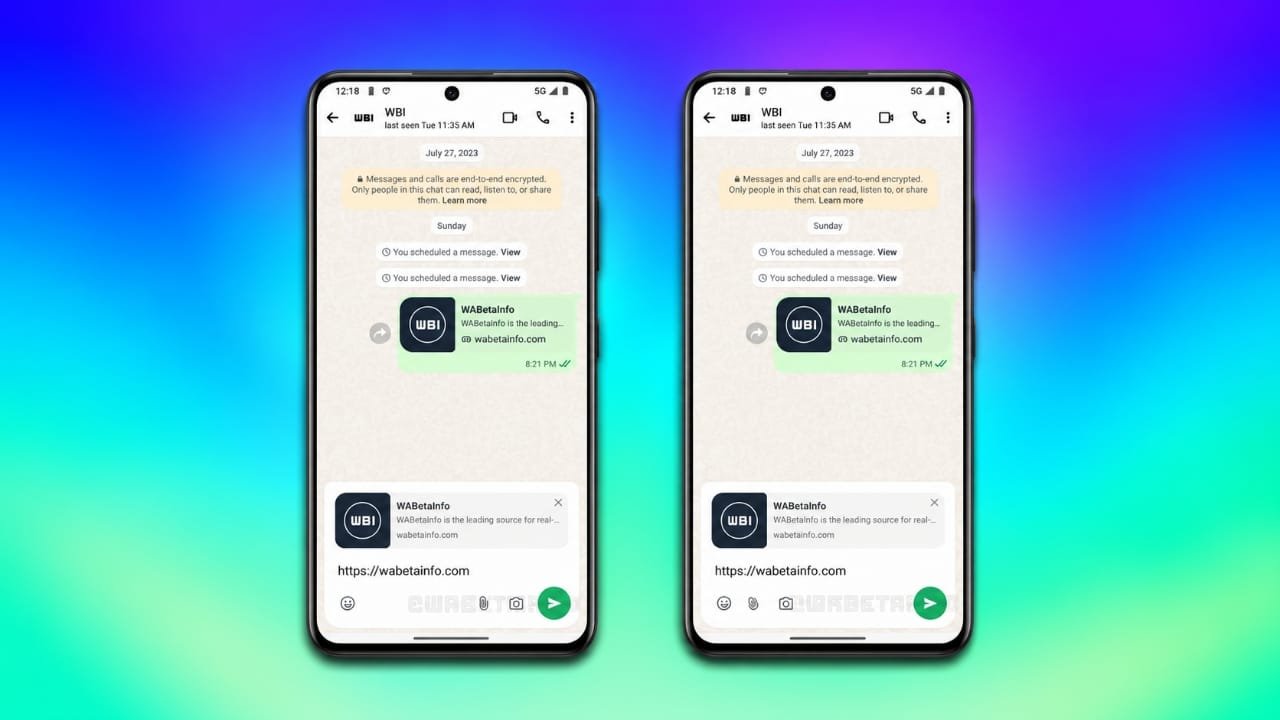
WhatsApp may soon introduce a fresh look for its Android messaging screen. The company is testing a redesigned chat bar that changes how users type messages and access common chat features. The new interface aims to give conversations a cleaner appearance while keeping important controls within easy reach.
The update is still under development, so its final design and public release date have not been confirmed. However, early beta reports provide a look at the changes WhatsApp is exploring.
Advertisements
Also read: Samsung Galaxy SmartTag 3 India Launch in January 2027: Features, Battery Life and Expected Price
WhatsApp Is Working on a New Chat Bar Design
According to a report from WABetaInfo, the redesigned chat bar was spotted in WhatsApp beta for Android version 2.26.41.11.
One of the main changes involves the placement of the send button. In the existing interface, the send button appears separately beside the message input field. The experimental design brings it into a more unified chat bar, giving the bottom section of the conversation screen a different appearance.
The message input area and action icons are also being rearranged. These adjustments could make the interface look more organized, although the final user experience will depend on which layout WhatsApp chooses for the public release.
Two Chat Bar Layouts Are Being Tested
WhatsApp is reportedly experimenting with two versions of the redesigned interface. Both follow a similar visual approach, but they arrange the messaging controls differently.
1. Emoji Button on the Left
In the first layout, the emoji button remains on the left side of the chat bar. The camera, attachment, and send controls are positioned toward the right.
This arrangement keeps the emoji option separate from the other actions while bringing the remaining controls closer together. Users who frequently switch between typing and sharing media may find this layout familiar.
2. All Action Icons Grouped on the Left
The second layout takes a different approach. The emoji, attachment, and camera icons are grouped on the left side, while the circular send button sits separately on the right.
This design gives the typing area a more unified appearance and creates a clear distinction between message-related actions and sending a message.
Since both versions are experimental, it is not yet clear which arrangement will become the default option.
A Modern Interface for Android Users
The redesigned chat bar is part of WhatsApp’s broader interface improvements. The messaging platform has also been exploring changes to its bottom navigation area, including floating elements and rounded visual details.
A more consistent design across these interface components could make the conversation screen feel more polished. Rounded shapes and carefully arranged controls can also help create a cleaner visual experience on different Android devices.
However, the exact appearance may change as development continues. The tested design should not be considered the final version until WhatsApp officially releases it.
Could the New Chat Bar Improve Everyday Messaging?
The updated layout focuses mainly on the arrangement of existing controls rather than introducing an entirely new messaging feature.
A more compact design could make frequently used options easier to locate. Depending on the final implementation, users may find it more convenient to switch between emojis, camera access, and file attachments while chatting.
The new arrangement may also help WhatsApp maintain a consistent appearance across the conversation screen. However, improvements in typing comfort, screen space, or one-handed use have not been confirmed and will depend on the final design.
For users who spend a lot of time messaging, even small interface changes can affect how comfortable the app feels during everyday use.
WhatsApp Redesigned Chat Bar: Old vs New
| Feature | Existing Interface | Experimental Design |
|---|---|---|
| Send button | Positioned beside the message field | Integrated into the redesigned chat bar |
| Text input | Uses the existing message field layout | Rearranged as part of the new design |
| Action icons | Follow the current layout | Available in two experimental arrangements |
| Overall appearance | Familiar WhatsApp interface | More unified and rounded design |
| Android version | Available in the existing app | Spotted in beta version 2.26.41.11 |
| Availability | Existing interface is available to users | New design remains under development |
When Will the Redesigned Chat Bar Be Available?
The redesigned chat bar is not yet confirmed as a feature available to all WhatsApp users. Its appearance in a beta build indicates that WhatsApp is exploring the design, but it does not guarantee an immediate public release.
The company may continue testing different layouts and make further adjustments before deciding whether to roll out the feature more widely. The final version could also differ from the designs currently being tested.
Users interested in trying experimental WhatsApp features can check the official Google Play beta program when enrollment is available. Joining the beta does not guarantee access to every feature, as experimental changes are often released gradually.
Also read: Google AI Plus Users May Lose Gemini Pro Access on November 13, 2026
Final Thoughts
WhatsApp’s redesigned Android chat bar could bring a more organized appearance to the messaging screen. The integrated send button and two experimental icon arrangements are the main changes reported so far.
For now, the feature remains under development, and WhatsApp has not confirmed a stable release date. Users should wait for an official rollout before expecting the new interface to appear in their regular app.
As testing progresses, future beta updates may provide a clearer picture of how WhatsApp plans to improve the messaging experience on Android.

I am a passionate Tech Writer with strong industry experience. I enjoy exploring the latest technological innovations and sharing clear, helpful insights with my audience.”
Advertisements