WT Hub – Web Scanner App is a utility-based Android application available on the Google Play Store. The app is designed to help users access WhatsApp Web features and manage certain WhatsApp-related activities in a more convenient way. It combines multiple tools such as QR code scanning for WhatsApp Web, status saving, and basic chat utilities into a single application.
This app is created for users who want an easy way to use WhatsApp Web on their mobile devices without complex steps. It is important to note that WT Hub is a third-party application and is not officially developed or endorsed by WhatsApp or Meta. The purpose of this article is to provide an honest and clear review of the app for informational use only.
Also read: How to Find Messages on WhatsApp (Android and iPhone)
Features of WT Hub – Web Scanner App
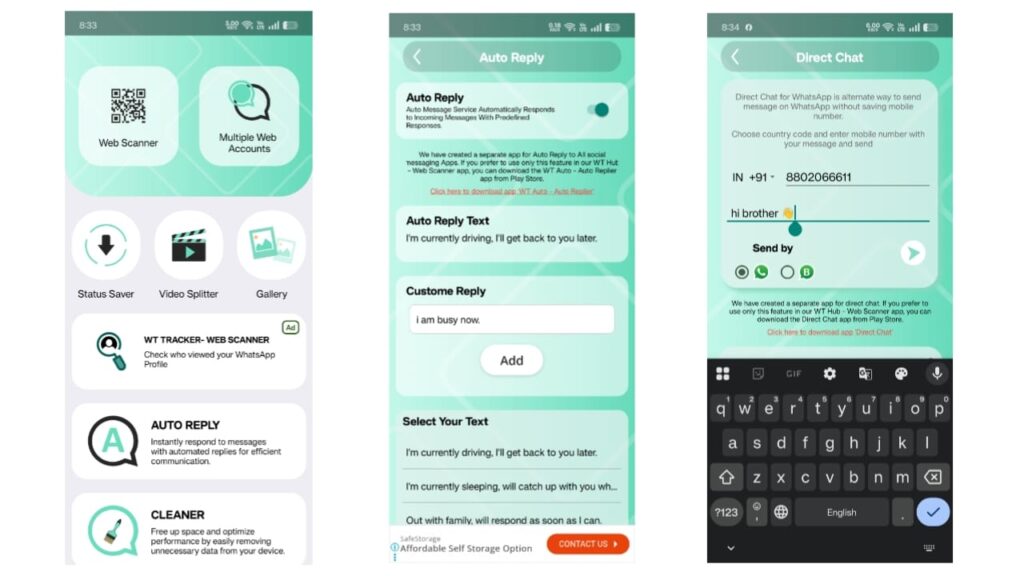
WT Hub – Web Scanner App offers several useful features that focus on WhatsApp Web convenience and content management. Below are the main features explained in simple terms:
WhatsApp Web QR Scanner
The app allows users to scan a QR code to connect their WhatsApp account with WhatsApp Web. This feature works using the same method provided by WhatsApp Web, where a QR code is scanned from the original WhatsApp app.
Status Saver
Users can view and save WhatsApp statuses, including photos and videos, directly to their phone storage. This feature is helpful for saving important or memorable statuses for personal use.
Chat Viewing and Management
Once WhatsApp Web is connected, users can view chats and messages through the app interface. This can be useful for people who prefer managing chats on a larger screen or secondary device.
Auto Reply Feature
WT Hub includes a basic auto-reply option that allows users to send predefined messages when they are busy or unavailable. This feature is intended for simple personal communication purposes.
Simple and User-Friendly Interface
The app is designed with a clean and easy-to-understand interface, making it suitable even for first-time users.
How to Use WT Hub – Web Scanner App
Using WT Hub – Web Scanner App is straightforward. Below is a step-by-step guide to help users understand the process:
- Install and open the WT Hub – Web Scanner App on your Android device.
- Allow the necessary permissions required for the app to function properly.
- Select the “Web Scanner” option from the main screen.
- Open WhatsApp on your primary phone.
- Go to WhatsApp settings and tap on “Linked Devices” or “WhatsApp Web.”
- Use your WhatsApp app to scan the QR code displayed inside WT Hub.
- After successful scanning, your WhatsApp Web session will be connected.
- You can now view chats and use other available features such as status saving.
Users are advised to scan QR codes only on their own devices to protect privacy and account security.
Also read: How to Change Font Style on WhatsApp (Simple and Safe Ways)
How to Download WT Hub – Web Scanner App from Google Play Store
WT Hub – Web Scanner App is officially available on the Google Play Store. Downloading the app from the Play Store ensures better security and regular updates.
Follow these steps to download the app safely:
- Open the Google Play Store on your Android phone.
- Search for WT Hub – Web Scanner App.
- Check the app details, developer information, and user reviews.
- Tap on the “Install” button to begin downloading.
- Once installed, open the app and follow the instructions.
For user convenience, an install button is provided below. By clicking on it, you will be redirected to the official Google Play Store page where you can safely download the application.
Top Features of WT Hub – Web Scanner App
Some key features that make WT Hub – Web Scanner App useful include:
- Fast and easy WhatsApp Web QR code scanning
- Built-in status saver for photos and videos
- Simple auto-reply option for basic communication
- Lightweight app with smooth performance
- Multiple WhatsApp-related tools in one application
- Easy navigation suitable for all users
These features make the app practical for users who want basic WhatsApp Web utilities without complicated settings.
Install
Conclusion
WT Hub – Web Scanner App is a helpful utility application for users who want to access WhatsApp Web features and manage statuses and chats more conveniently. The app offers a simple interface and combines multiple tools into one place, which can save time for regular users.
However, users should remember that this is a third-party application and not an official WhatsApp product. It should be used responsibly, and users should always prioritize privacy and security while using WhatsApp Web-related tools.
Overall, WT Hub – Web Scanner App can be considered a useful option for personal convenience, provided it is downloaded from the official Google Play Store and used with proper awareness.
Also read: How to Show a Full Profile Photo on WhatsApp Without Cropping
Disclaimer
This article is published for informational purposes only. WT Hub – Web Scanner App is a third-party application and is not affiliated with, endorsed by, or associated with WhatsApp or Meta Platforms. App features, permissions, and availability may change over time. Users are advised to review the app’s details, privacy policy, and terms on the Google Play Store before installing or using the application. The website and author are not responsible for any misuse or issues arising from the use of this app.

I am a passionate Tech Writer with strong industry experience. I enjoy exploring the latest technological innovations and sharing clear, helpful insights with my audience.”