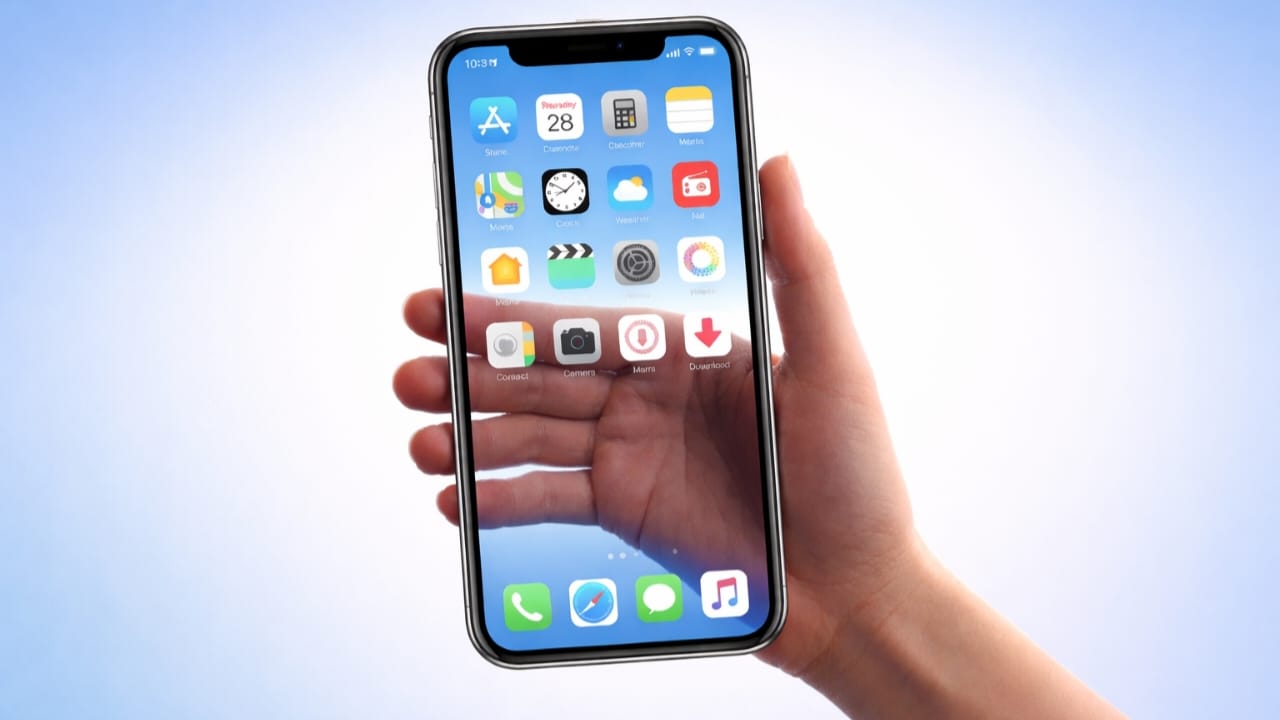
Transparent wallpaper is a creative way to give your phone a fresh and modern look. With this feature, your screen appears see-through because the background shows a live camera view instead of a normal image. Your app icons stay visible on top, creating a unique visual effect.
In this guide, you’ll learn what transparent wallpaper actually is, how it works, which permissions it needs, and how to use it safely on both Android and iPhone devices.
Also read: How to Change Font Style on WhatsApp (Simple and Safe Ways)
What Does Transparent Wallpaper Mean?
A transparent wallpaper is a type of live background that displays real-time camera output behind your home screen icons. Instead of using a photo or graphic, your phone shows what’s in front of the camera, making the screen look clear or glass-like.
This effect is only visual. Your phone screen is not truly transparent.
How Transparent Wallpaper Works
Here’s what happens in the background:
- The wallpaper app connects to your phone’s camera
- The live camera view is used as the background
- App icons and widgets remain on top
- The screen looks see-through while you use your phone
The effect works only when the wallpaper is active.
Is Using Transparent Wallpaper Safe?
Yes, transparent wallpaper apps are generally safe when downloaded from official app stores like Google Play Store or Apple App Store.
These apps only use the camera to create the visual effect. They do not record or store videos unless clearly mentioned in the app settings.
Important Safety Tips
Before installing any transparent wallpaper app, keep these points in mind:
- Camera permission is required for live background effects
- Some apps may ask for storage access to save settings
- Avoid apps that request unnecessary permissions like contacts or messages
- Always check reviews, ratings, and the privacy policy
- Install apps only from trusted sources
Using a reliable app keeps your device secure.
Common Features You’ll Find in Transparent Wallpaper Apps
Most apps offer simple and useful features such as:
- Live camera background
- Adjustable transparency level
- Support for home screen and lock screen
- Battery-friendly settings
- One-tap wallpaper setup
- No access to personal files or photos
How to Set Transparent Wallpaper on Android
Android devices support live wallpapers, making the process simple.
Step 1: Install a Trusted App
Open Google Play Store and download a verified transparent wallpaper app.
Step 2: Allow Required Permissions
When you open the app, it may ask for:
- Camera access (needed for the live effect)
- Storage access (optional, for saving settings)
These permissions are normal for this type of app.
Step 3: Preview the Effect
The app will show a live preview so you can see how your screen will look.
Step 4: Apply the Wallpaper
Choose where you want the wallpaper:
- Home screen
- Lock screen
- Both
The wallpaper will be applied instantly.
How to Use Transparent-Style Wallpapers on iPhone
iPhones do not support real transparent live wallpapers due to system limitations. However, you can still create a similar look using safe alternatives.
Option 1: Dynamic or Motion Wallpaper Apps
Some apps create motion-based backgrounds that give a depth or glass effect without using the camera in the background.
Option 2: Live Photos on Lock Screen
You can set a Live Photo as your lock screen wallpaper. When you press the screen, it shows motion, creating a dynamic feel.
Option 3: Transparent Widget Layouts
Widget apps allow you to match widgets with your wallpaper, giving a clean and layered appearance.
These methods follow Apple’s privacy and battery rules.
Permissions Required by Transparent Wallpaper Apps
On Android:
- Camera – Required for live background
- Storage – Optional, for saving preferences
On iPhone:
- Photos – To use or save wallpapers
- Camera – Only for preview or AR features, not live wallpaper use
Always allow only the permissions needed for the app to work properly.
A Safe Transparent Wallpaper App for Android
Transparent Screen & Live Wallpaper (Android)
Available on Google Play Store
Install
This app uses your phone’s camera to create a transparent wallpaper effect. It offers live preview, adjustable settings, and an easy setup process. The app follows Play Store guidelines and requests only essential permissions like camera access for real-time background display.
It’s a good option if you want a simple and clean transparent wallpaper experience on Android.
Also read: How to Show a Full Profile Photo on WhatsApp Without Cropping
Final Words
Transparent wallpapers are a fun way to personalize your smartphone. Android users can enjoy true live transparent backgrounds, while iPhone users can achieve similar effects through live photos, motion wallpapers, or smart widget setups.
For the best experience, always choose trusted apps, review permissions carefully, and download only from official app stores. With the right approach, you can safely enjoy a stylish and modern transparent screen on your phone.

I am a passionate Tech Writer with strong industry experience. I enjoy exploring the latest technological innovations and sharing clear, helpful insights with my audience.”