E2PDF – Call Backup Restore is a productivity-focused Android application developed by Day Dreamer LLC. The app is designed to help users back up important phone data such as SMS messages, call logs, and contacts in a simple and organized way. In today’s digital world, smartphones store valuable communication records, and losing this data due to phone damage, reset, or upgrade can be frustrating.
E2PDF offers a practical solution by allowing users to export their data into PDF files, making it easy to store, view, and share backups when needed. The app is available on the Google Play Store and is mainly used by people who want a reliable local backup option without complicated setup.
This article provides an honest and informative review of E2PDF, covering its features, usage process, download method, top highlights, and overall performance.
Also read: Time-Based Phone Lock on Android: A Simple Guide to Screen Lock Time Passwords
Features of E2PDF – Call Backup Restore App
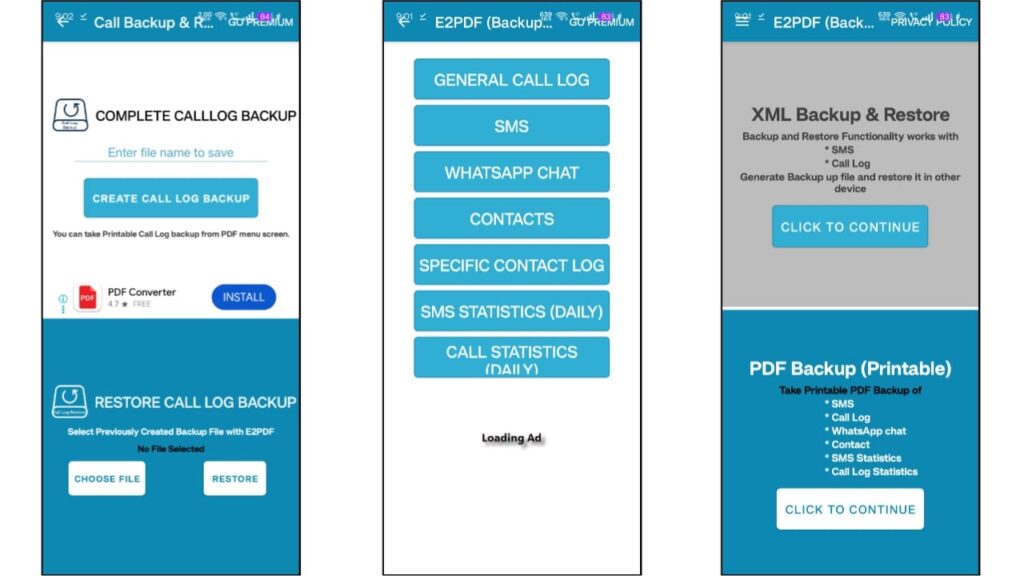
E2PDF comes with several useful features focused on data backup and export. Below are the main features explained clearly:
SMS Backup to PDF
The app allows users to back up their SMS messages and export them into PDF format. This is helpful for keeping important conversations saved for future reference.
Call Log Backup
Users can back up incoming, outgoing, and missed call logs. The call history is organized neatly in PDF files, making it easy to review past calls.
Contact Backup
E2PDF supports contact backup, allowing users to save contact details securely. This feature is useful when switching phones or resetting a device.
PDF File Format
All backups are saved in PDF format, which is easy to open on almost any device. PDFs also make it convenient to print or share backups when required.
Selective Backup Options
Users can choose what they want to back up instead of exporting everything at once. This gives better control over data management.
Daily Statistics
The app provides basic daily statistics related to SMS and call activity, helping users understand their communication patterns.
Simple and Clean Interface
E2PDF has a clean and user-friendly design. Even first-time users can navigate the app easily without confusion.
Local Storage Backup
All backup files are stored locally on the user’s device. This gives users full control over their data without automatic cloud syncing.
Free Version with Optional Upgrade
The app is free to use with ads. Users who prefer an ad-free experience can choose an in-app purchase option.
How to Use E2PDF – Call Backup Restore App
Using E2PDF is straightforward and does not require technical knowledge. Follow the steps below:
- Install and open the E2PDF app on your Android phone.
- On the home screen, select the type of data you want to back up (SMS, Call Logs, or Contacts).
- The app will request necessary permissions to access messages, calls, or contacts.
- Grant the required permissions to continue.
- Choose backup settings such as date range or file name (if available).
- Tap on the export or backup button.
- The app will generate a PDF file containing the selected data.
- The PDF file will be saved on your device for later access.
Users can open these PDF files anytime to view or share their backups.
Also read: How to Apply Transparent Wallpaper on Android and iPhone (Easy Guide)
How to Download E2PDF from Google Play Store
E2PDF – Call Backup Restore app is officially available on the Google Play Store. Downloading from the Play Store ensures safety and regular updates.
Steps to download:
- Open the Google Play Store on your Android device.
- Search for E2PDF – Call Backup Restore.
- Check the app details, developer name, and user ratings.
- Tap the Install button and wait for the download to complete.
- Open the app after installation and follow the setup instructions.
For user convenience, an install button can be provided below. By clicking on it, users will be redirected to the official Google Play Store page to download the app safely.
Top Features of E2PDF – Call Backup Restore App
Some features that make E2PDF a useful backup tool include:
- Easy SMS, call log, and contact backup
- PDF format for better readability and sharing
- Clean and beginner-friendly interface
- Selective backup options
- Lightweight app with smooth performance
- Local storage control for user data
- Free version available with optional upgrade
These features make the app suitable for users who want a simple and reliable backup solution.
Also read: How to Find Messages on WhatsApp (Android and iPhone)
Pros and Cons
Pros
- Simple and easy to use
- Supports multiple data types
- PDF export is practical and accessible
- Lightweight and stable performance
- Useful for phone switching or data safety
Cons
- Ads in the free version
- No built-in cloud backup
- Advanced users may want more customization
Install
Conclusion
E2PDF – Call Backup Restore is a practical application for users who want to keep their SMS messages, call logs, and contacts safe. The app focuses on simplicity and reliability, making it suitable for everyday users. Exporting data in PDF format adds convenience and flexibility.
While the free version includes ads and lacks cloud backup, the core functionality works well for local data protection. For users who value their communication records and want a straightforward backup solution, E2PDF is a useful option available on the Google Play Store.
Disclaimer
This article is published for informational purposes only. E2PDF – Call Backup Restore is a third-party application available on the Google Play Store and is not affiliated with Google or Android. App features, permissions, and availability may change over time. Users are advised to review the app’s privacy policy and permissions before installing or using the application. The website and author are not responsible for data usage or loss.

I am a passionate Tech Writer with strong industry experience. I enjoy exploring the latest technological innovations and sharing clear, helpful insights with my audience.”